APPS & INTEGRATIONS
Manage Casas Bahia after-sales in Zendesk.
Centralize Casas Bahia incidents in Zendesk, access customer and order information, and manage resolutions directly from each ticket.
Bring your Casas Bahia after-sales operations together with your other customer service channels, all in one place.
Bring your Casas Bahia after-sales operations together with your other customer service channels, all in one place.

THE CHALLENGE
Different sales channels. One customer service experience.
Disconnected channels
Managing Casas Bahia incidents separately from your other support channels.
Switching between platforms
Moving between systems to access information and handle incidents.
Limited case visibility
Keeping track of incident details and progress across different tools.
More administrative work
Repeating tasks that could be managed within your existing support workflow.
Bring Casas Bahia after-sales support into Zendesk and manage every case alongside your other customer service channels.
INCIDENT INFORMATION
All the incident details, right inside Zendesk.
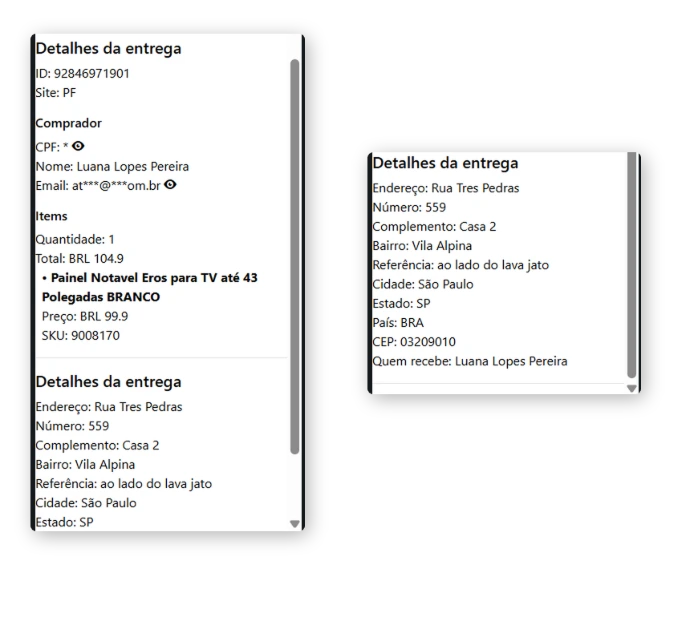
Access Casas Bahia incident information directly from each Zendesk ticket, giving your team the context needed to understand and manage every case.
- Incident details: View the incident ID, type and protocol number.
- Customer information: Access buyer details associated with the order.
- Product details: Review products, quantities, prices and SKUs.
- Delivery information: Check shipping details, delivery address and recipient information.
INCIDENT MANAGEMENT
Send solutions and manage incidents from Zendesk.
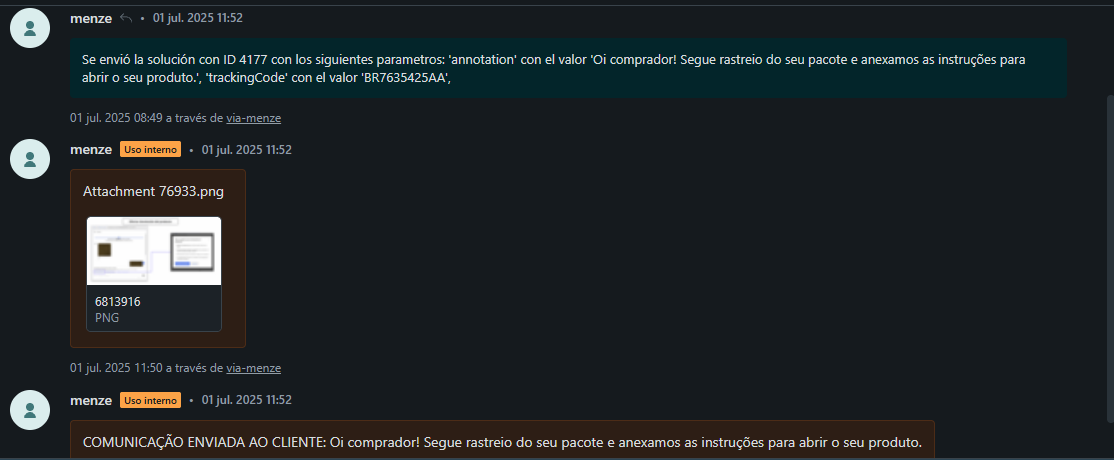
Handle Casas Bahia after-sales incidents without leaving Zendesk. Send solutions, attach supporting documentation and keep track of every action within the ticket.
- Send solutions: Manage available solutions for each incident and send them directly to Casas Bahia.
- Attach documentation: Include files and supporting documents when needed to resolve an incident.
- Track every action: Keep a record of submitted solutions, attachments and customer communications in the ticket history.